I. I Thought I Was Multitasking, But I Was Actually Scheduling
The story goes like this.
One day, I set a task on the Claude desktop client that was expected to take over ten minutes. I thought, well, I can’t do anything productive during that time, but I also didn’t want to do nothing, so I picked up my phone and started scrolling through short videos.
As I scrolled, I suddenly remembered Claude and switched back to check. There was a permission popup. The task had stalled, and nothing was done.
I dismissed it and restarted the task.
I continued scrolling.
After a while, I felt uneasy and checked back again. It was still running.
Back to scrolling. Check back. Back to scrolling. Check back.
Later, I realized that I had accomplished nothing that entire morning. The short video feed pushed 200 videos to me, while Claude had timed out due to my missed permission. I thought I was “making good use of my waiting time,” but in reality, I was doing a full-time job called “monitoring Claude.”
II. The Problem Isn’t Claude Being Slow, It’s Its Silence
You should understand this feeling. When Claude is running a task on the desktop, the issue isn’t that it’s slow, but that it operates silently.
It doesn’t pop up to say, “Boss, I’m done,” when it finishes, nor does it alert you before the permission popup times out.
It quietly stays in that window, but your mind is always tethered to it.
As I was tethered, I couldn’t focus on anything serious, so I resorted to the lowest-effort entertainment to fill the void.
I wasn’t scrolling through short videos because I wanted to; it was because that fragmented, interruptible content matched my “I don’t know if I need to switch back at any moment” standby state. This is a passive choice.
Even if I spent three minutes watching a short video, when I returned, I realized that I had wasted the previous ten minutes waiting.
I pondered this for a while.
Clearly, Claude is the most comfortable AI tool I’ve used, powerful and contextually aware, doing whatever I ask. So why did I feel more exhausted than before?
After a night of thinking, I realized the problem lay in the working mode, not the tool itself.
Most work tools today operate in a “polling” mode, where you have to keep checking to know the status.
You have to refresh WeChat, open Notion, and Claude remains silent until you check back.
So we spend our days switching windows, effectively doing proactive polling for these tools.
We think we’re working, but we’re actually scheduling.
To break this cycle, the only solution is to let the tools come to me.
If they have something to say, they should alert me; if not, leave me alone.
I decided to add some sound to Claude.
III. The Simplest Version Starts with a Line of afplay
The simplest solution is to use the hooks left by Claude.
Many may not know that Claude Code has a mechanism called hooks, which triggers a pre-set command whenever events like permission requests, task completions, sub-task completions, or session starts occur. The configuration is written in ~/.claude/settings.json. My first thought was to simply use afplay to play a macOS system sound.
The code looks something like this.
I first tested it in Claude Code (the CLI in the terminal).
Ding.
I laughed.
But this wasn’t the final state I wanted.
When using Claude Code, I wouldn’t scroll through short videos because it types line by line in the terminal, and I find it engaging.
What really distracts me is the desktop version, which is in chat form. After sending a command, the screen goes silent, and my attention immediately drifts away.
IV. The Desktop Client Challenge Was Simpler Than I Thought
So I opened the desktop client and ran a task.
No sound.
= =
Initially, I thought the desktop client didn’t trigger hooks.
Logically, it made sense; the hooks are configured in ~/.claude/settings.json, which is for the Claude Code CLI, while the desktop client is a separate entity.
I shared this conclusion with a few friends in the group.
Then one friend ran my initial tool on his desktop client and later said in the group, “There is sound.”
I was stunned.
After checking for a while, I figured out that the desktop client actually runs commands by launching a Claude Code subprocess, so it’s still the CLI responding to hooks.
However, the subprocess running on the desktop couldn’t directly use afplay because it didn’t have the correct runtime environment, so the command mode wouldn’t work.
It could send requests outward, so the correct approach was to start an HTTP server to receive events and play sounds.
This meant changing the hooks from command mode to HTTP mode, replacing afplay xxx.aiff with curl -X POST http://127.0.0.1:3737/api/play-hook?type=Stop.
V. The Structure of the Entire Tool is Actually Three Parts
At this point, the structure of the entire tool became clear.
It essentially has three parts.
- Receiving: A local HTTP server running on
127.0.0.1:3737listens for the/api/play-hookendpoint. When an event occurs, it plays a sound. - Triggering: Change Claude’s hooks configuration to send a
curl POSTrequest to the endpoint above, so Claude automatically calls the server when something happens. - Guarding: Use macOS LaunchAgent to take over the server, ensuring it stays alive even if the menu bar app is closed or the computer is restarted.
The data flow can be illustrated like this.
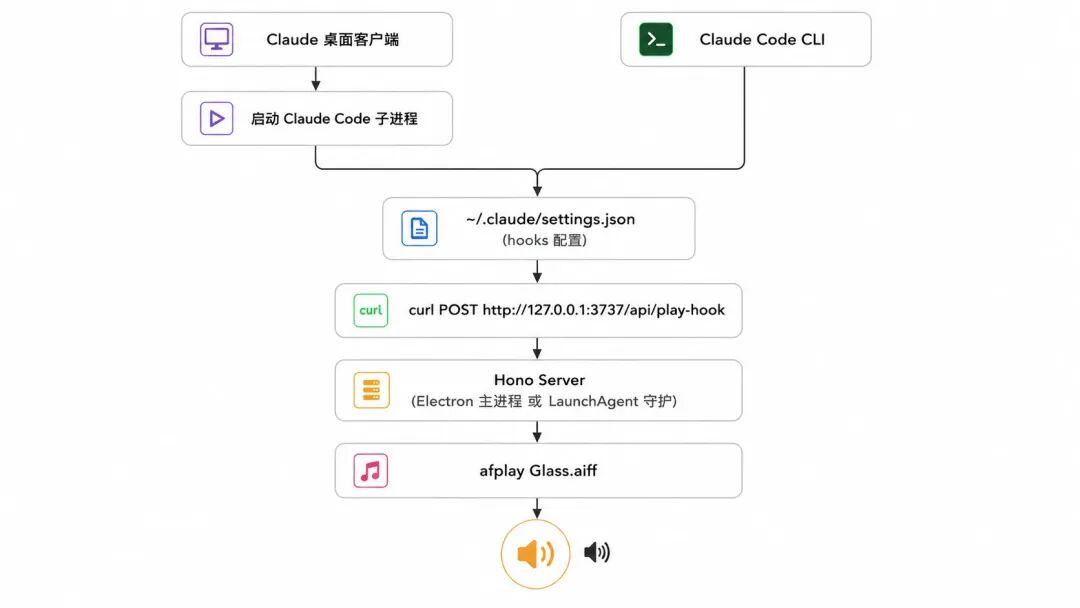
The line from the desktop client and the line from Claude Code eventually converge at the hooks layer because the desktop client runs commands by starting a Claude Code subprocess, both using the same hooks configuration. This also explains my earlier classic misjudgment: the CLI could produce sound while the desktop client could not; it wasn’t that the hooks didn’t trigger, but that the subprocess running the command couldn’t access the afplay command mode, requiring HTTP instead.
Now that the structure is clear, let’s revisit some obstacles I encountered.
VI. The First Wall: Clash Verge Intercepted localhost
I need to elaborate on this because it will become a roadblock for most developers using similar tools in China.
I was using Clash Verge with system proxy as my default configuration most of the time. The curl request initiated by the Claude desktop client was treated by Clash as regular HTTP traffic and kicked to the proxy server.
The proxy saw 127.0.0.1, which cannot be routed externally, resulting in a 502 error.
When localhost is forwarded through the proxy, it results in a 502 error, and anyone encountering this for the first time will take time to figure it out.
Opening the Clash connection panel clarified that all localhost requests were being routed through the proxy.
The solution is to add a segment to the merge template in the Clash profile to let localhost go DIRECT, without going through the proxy.
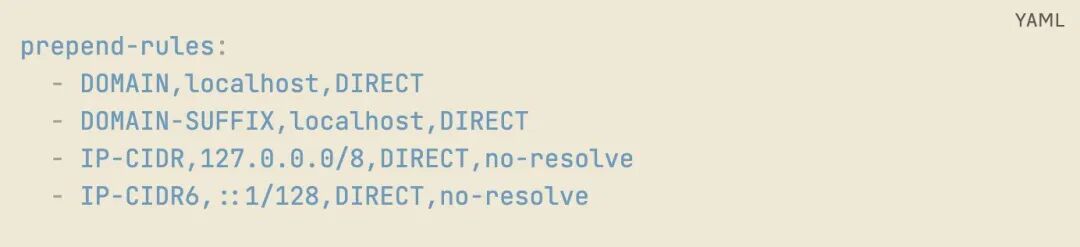
After adding these four lines, I restarted Clash.
Ding.
VII. The Second Wall: I Was Watching the Wrong Dashboard
This was the most ridiculous wall, as it was purely my own mistake.
I expanded this server into a menu bar app using Electron. To allow the app to continue responding in the background after the user closes it, I added a LaunchAgent to ensure it remains active even after a computer restart.
When the LaunchAgent runs, it operates as a headless process, so I redirected the server’s console.log to /tmp/claude-sound.log.
The problem arose when the user double-clicked the app to start it; the server was running in the Electron main process, and the console.log went to Electron’s system logs, not writing to the /tmp file at all.
I got confused.
When testing the desktop client, the app was just started (in GUI mode), but I checked /tmp/claude-sound.log (which was only used in the LaunchAgent headless mode), and the file was empty, leading me to conclude that the desktop client didn’t trigger the hook.
I shared this conclusion with a friend.
Then he tested my tool and told me the desktop client had sound.
I was stunned.
After going back to review the log writing paths, I realized my mistake. The server started in GUI mode wasn’t writing to that log file.
It had been responding all along; I just misread the dashboard.
I reflected on this later.
The user’s ears and the direct curl test are always more reliable than your preset diagnostic paths.
The pitfall developers often fall into isn’t about failing to implement features, but using the wrong observation methods, leading to incorrect conclusions based on those observations, and then making flawed design decisions based on those incorrect conclusions.
It can look professional, but if nothing is diagnosed correctly, it’s all for naught.
VIII. The Third Wall: Gatekeeper
I didn’t pretend to avoid this pitfall.
I didn’t purchase an Apple developer certificate for signing (99 dollars a year, which I hadn’t decided on for a personal project), so when users first opened the app, they encountered a red box stating “developer cannot be verified.” I included a line in the README: xattr -dr com.apple.quarantine /Applications/Claude Sound.app to lift the quarantine.
It’s just one line, but I know that command isn’t user-friendly for those unfamiliar with the terminal.
If this tool gains more users, I’ll get the signing done.
IX. Version 0.2.0 Looks Like This
After discussing the pitfalls, let’s talk about the results.
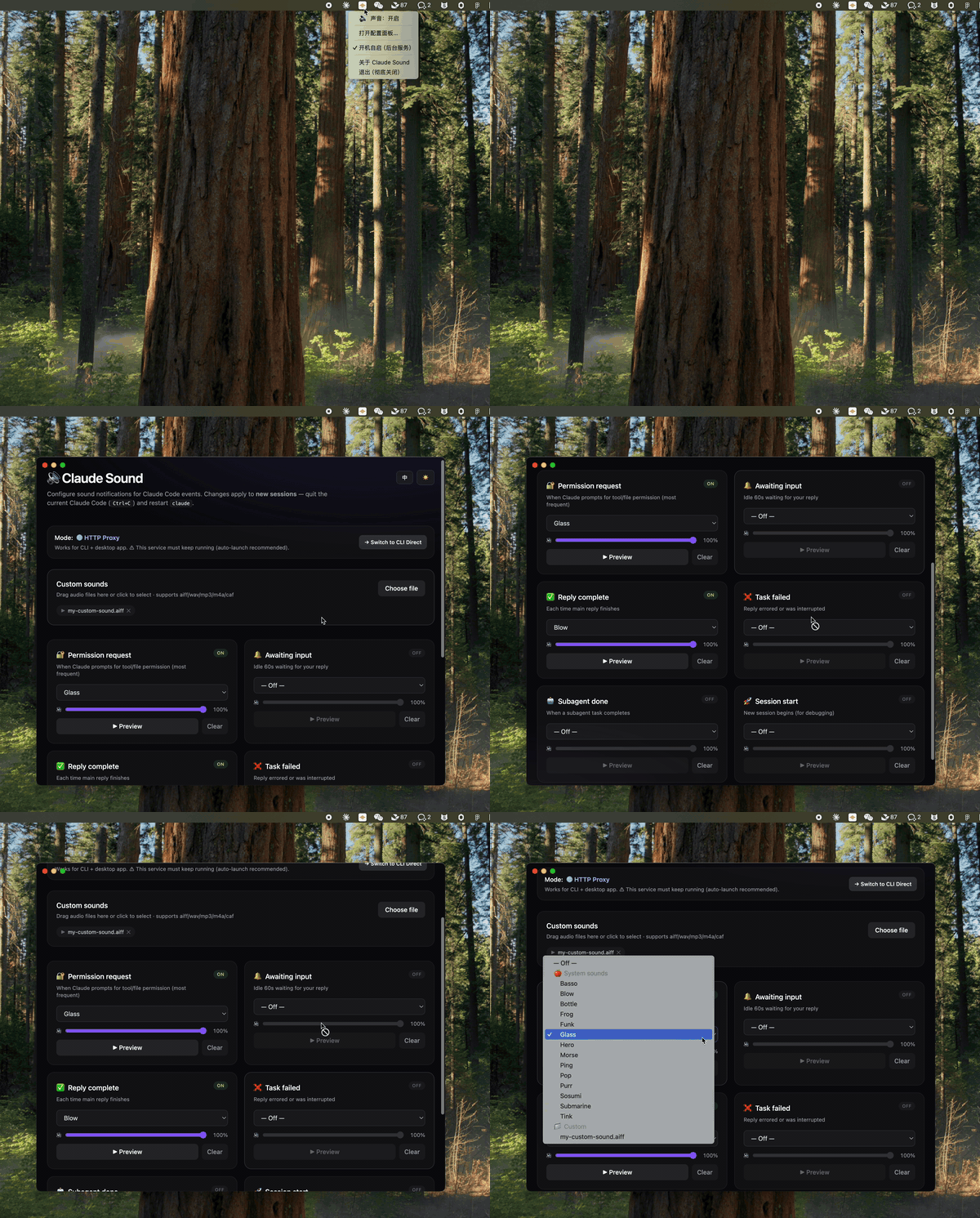
I supported six types of events, each capable of playing its own sound.
Specifically, these are: PermissionRequest (permission request), Notification (system notification), Stop (task completion), StopFailure (task failure), SubagentStop (sub-task completion), and SessionStart (session start).
Each event can independently select system sounds, adjust volume, or upload custom audio files.
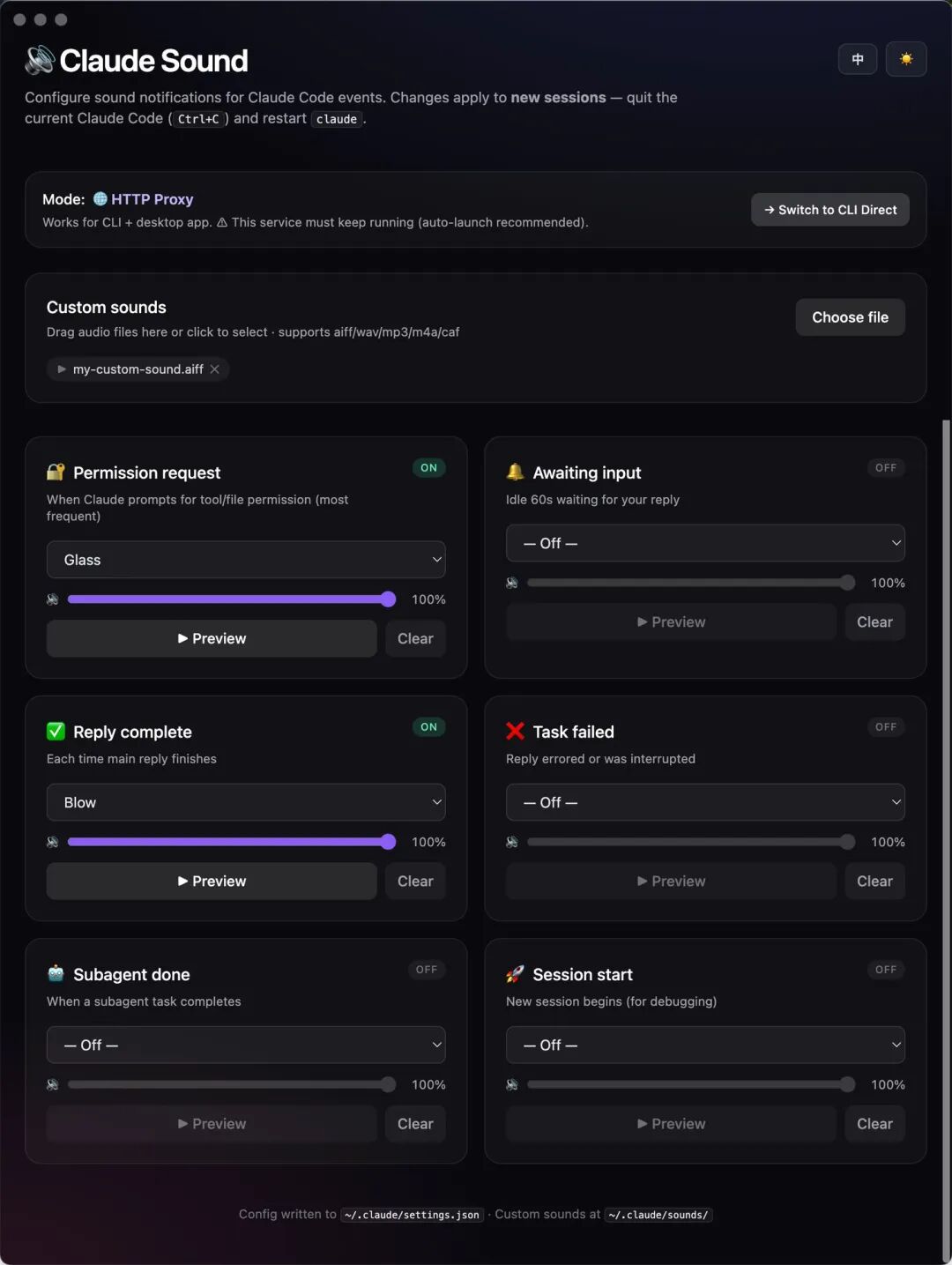
The interface supports both English and Chinese, with light and dark themes that switch with the system.
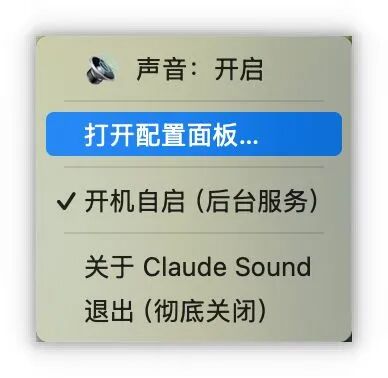
Clicking in the menu bar provides a master switch to turn off all sounds; when you want to turn them back on, just click again, and the configuration won’t be lost.
X. After Installation, I Finished That Paper I Had Been Procrastinating For Three Weeks
After installation, I reran the task that had previously caused me to scroll through 200 short videos.
While Claude was running, I opened a paper I had been meaning to read but had procrastinated on for three weeks.
About 15 minutes in, I heard “Glass,” the sound I set for PermissionRequest, and I knew I needed to approve the permission, so I cmd+tabbed to click Allow and then returned to the paper. After about 20 minutes, I heard “Blow,” indicating it was all done, and I checked the results.
Throughout the process, I didn’t switch windows even once, nor did I scroll through a single short video.
It may not seem like much.
But think back to when you were running long tasks in the past; didn’t you subconsciously cmd+tab every few minutes? Or instinctively check your phone? That action doesn’t require a decision; it’s your brain secretly polling.
After adding sound, that reflex didn’t occur because my brain knew someone would alert me if something happened.
This is the difference between “polling” and “interrupt-driven.”
Phone calls and WeChat also illustrate this difference. With WeChat, you have to refresh; nine times out of ten, nothing happens;
But you only answer the phone when it rings; if it doesn’t ring, you don’t think about it.
By adding sound notifications to Claude, it transformed from WeChat into a phone call.
It’s not that “there’s sound now, so I’m happy,” but that I no longer have to poll myself; I can truly immerse myself in another task.
Now, when I run long tasks again, I can genuinely finish that paper, write a segment, or hold an uninterrupted meeting.
When Claude has something to say, it will come to me.
I realized that for the past few months, I thought I was “multitasking,” but I wasn’t deeply engaged in either task.
所谓多任务,说到底就是多次中断单任务,每次中断都要付出重新进入心流的成本。
An entire morning of switching windows 30 times and checking my phone 30 times equates to my brain performing 60 cold starts.
What’s more painful is that the reason I always scrolled through short videos wasn’t that I didn’t love reading, but because my “standby state” of “I might need to switch back at any moment” simply didn’t allow me to read.
Reading requires a continuous, uninterrupted focus, while my state could only last 30 seconds at most.
In that state, the only entertainment that matched was short videos.
XI. Attention is the Most Expensive Thing in This Era
However, I later dug deeper.
Scrolling through short videos isn’t inherently a problem.
In fragmented time, if you want to scroll, go ahead; if you want to relax, relax; if you want to do housework, do it—no problem.
The issue is whether that “fragmentation” is your choice or forced by the tool’s silence.
In this era, attention is the most expensive thing.
More expensive than time, because time can return after a good sleep, but once attention is fragmented, it truly cannot come back.
The more we use AI, the more waiting states we experience.
When AI runs a long task, that time is either “my proactive decision to rest” or “a daze secretly decided by the tool’s silence.” It may sound similar, but the results are entirely different. The former is my control over my time, while the latter means I’ve handed the steering wheel over to the tool.
So, installing a sound reminder isn’t just about preventing laziness.
After installing it, I still scroll through short videos when I want to, and I still relax when I want to. What it does is take back the steering wheel.
It allows me to choose to immerse myself in work or to actively relax, but that choice is mine, not the default state imposed by the tool.
After installing this tool, I roughly estimated my daily cmd+tab usage; it has decreased by at least 70%.
I didn’t count how many times I checked my phone, but looking at my screen time before bed, my Douyin usage dropped from over two hours to 40 minutes. What decreased wasn’t that “I became disciplined,” but that “I regained my choice.”
XII. I Dismantled My App and Remade It
I initially thought the previous section would be the conclusion. However, after using version 0.2.0 for a few days, I encountered a new problem.
One day, after restarting my computer, I opened the Claude desktop client, sent a long task, and turned to do something else.
Half an hour later, I returned to find the task had long been completed, but I didn’t hear any sound at all.
I thought something must be broken again.
I tried restarting the app, restarting Claude, and restarting the computer. I checked the server’s status interface; it was enabled. I looked at the hooks configuration; it was normal. I directly curl the server’s play-hook interface, and it could play.
But whenever Claude triggered the hook, there was no sound.
I stared at the code for a while before realizing.
The HTTP mode has a gap I hadn’t considered before.
When the app closes and a new process starts the server, there’s a 2-5 second window where the server is completely offline. Claude Code triggers hooks with fire-and-forget HTTP requests; if it fails, it fails without retrying.
If you happen to run a long task while the app is restarting or the computer is rebooting, that Stop event is permanently missed.
What’s worse is that once the Claude Code process experiences a hook failure, its state may get stuck, and even if the server recovers, it won’t trigger again.
I can’t guarantee this, but my tests suggest it’s true.
This means that all the engineering operations I performed earlier—Electron + LaunchAgent + single-instance lock + master switch persistence + bilingual themes—were built on a hidden premise that the server is always online.
Once that premise is broken, the entire engineering structure collapses.
The most ironic temporary fix is this:
I disabled the entire Claude Sound App, disabled the LaunchAgent, and returned to the simplest solution.
Directly writing the hooks like this:
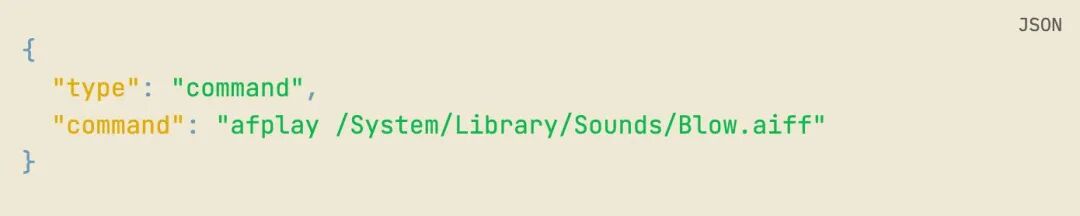
afplay is a built-in macOS command that is always available.
Claude Code triggers hooks directly by spawning an afplay subprocess; the entire chain doesn’t require any server, any Electron process, or any background daemon.
Computer restarts don’t affect it.
App restarts don’t affect it. cmd+Q doesn’t affect it either. Because there’s no app layer at all.
I’ve thought about this for a long time.
The most valuable part of the entire tool I created is actually that core insight from the first half: using sound to transform Claude from “polling” to “interrupt-driven.” This insight, when broken down to execution, is simply “let Claude Code play a system sound when triggering events.”
The hooks mechanism that Claude Code provides + the built-in afplay command from macOS is already completely sufficient.
The reason I created an Electron app was that I wanted a GUI configuration panel, a master switch, bilingual themes, custom sound uploads, and a LaunchAgent daemon to ensure it stays alive.
All of these sound reasonable, but combined, they lead to over-engineering.
What’s more painful is that every additional layer of daemon I added became a new source of failure.
The LaunchAgent occasionally fails to take over correctly.
Electron restarts have gaps.
The server spawning afplay occasionally fails in the sandbox.
With every additional layer, the reliability of the entire system drops a notch.
The KISS principle states that adding features is easy, but removing them is hard.
I thought I had learned this principle, but this time, I was the one who fell victim to my own over-engineering for several days before finally swallowing my pride.
However, simply disabling it only solved my problem.
Every user of version 0.2.0 will encounter the same pitfall in the app restart/computer restart scenario.
Comments
Discussion is powered by Giscus (GitHub Discussions). Add
repo,repoID,category, andcategoryIDunder[params.comments.giscus]inhugo.tomlusing the values from the Giscus setup tool.