Recently, Anthropic’s blog on “How to Manage One Million Tokens of Context” revisited the issue of “context rot,” which simply means:
The longer the context, the dumber the model.
Anthropic explains that the context window refers to all the content the model can “see” when generating the next response. This includes your system prompts, the conversation so far, every tool invocation and its output, and all files read.
Currently, Claude Code has a context window of one million tokens.
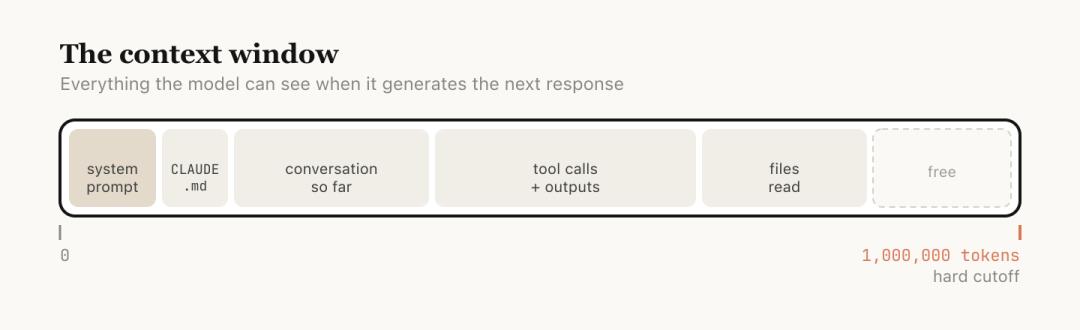
However, longer context is not always better. The model’s attention is diluted across more tokens, and earlier, irrelevant content begins to interfere with the current task, leading to decreased performance. This is what is meant by “context rot.”
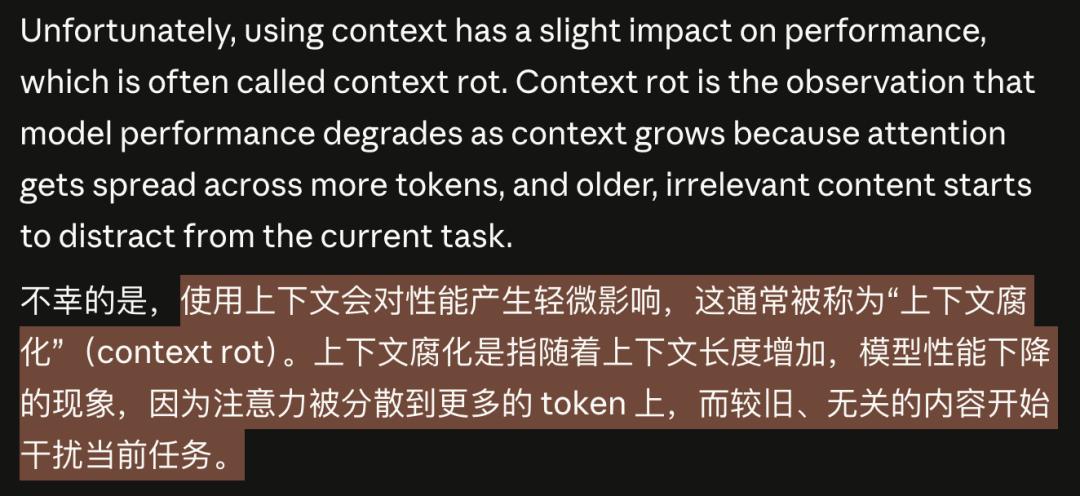
This concept is not a community invention but comes directly from Anthropic’s official blog.
As early as February this year, when Sonnet 4.6 was released, the announcement stated that Sonnet 4.6 provided a beta version of a one million token context window.
But one million tokens do not equal one million effective tokens.
Every message you send, every file read, and every tool invocation dilutes the model’s attention.
Earlier irrelevant content does not automatically disappear; it continues to interfere with current tasks like noise.
After raising the issue, Anthropic provided a complete management method through this blog.
First, they inform you that “your conversation is rotting,” and then they guide you on how to fix it.
Longer Context Makes AI Dumber
Let’s break down the mechanism of “context rot.”
One million tokens sounds like a lot.
A medium-sized codebase, including documentation and source code, might only be a few hundred thousand tokens. In theory, you could fit the entire project in and ask questions freely.
But the model’s attention is a limited resource.
The configuration file you read two hours ago, the log of a debugging failure from an hour ago, and the dead-end you explored half an hour ago are all still in the window, all competing for the model’s attention.
This is the mechanism of context rot: the model is forced to “remember” too many irrelevant things at once, making it unable to focus on the task at hand.
You might think this is similar to how humans lose focus during long meetings.
Indeed, information overload leads to diluted attention, which is a bandwidth issue, not a capability issue.
Worse, when the context approaches the one million token limit, the system automatically triggers “compaction”:
This means summarizing the entire conversation into a shorter abstract and continuing to work in a new window.
This sounds intelligent, but the moment automatic compaction occurs is precisely when the context is longest and the model’s performance is worst.
Using the model in its dumbest state to make the most critical summary is inherently unreliable.
Each Conversation Round is a Decision Point
Anthropic defines each interaction in the blog as a decision node.
After each interaction, you are actually at a crossroads, not just the option to “continue chatting.”
First option: Continue. Send another message in the same session and continue chatting. The context is still relevant, so there’s no need to complicate things. This is the most natural choice and is often sufficient.
Second option: /rewind. Press Esc twice to jump back to a previous message and start from there.
The official blog provides an accurate judgment: It’s better to rewind than to correct.
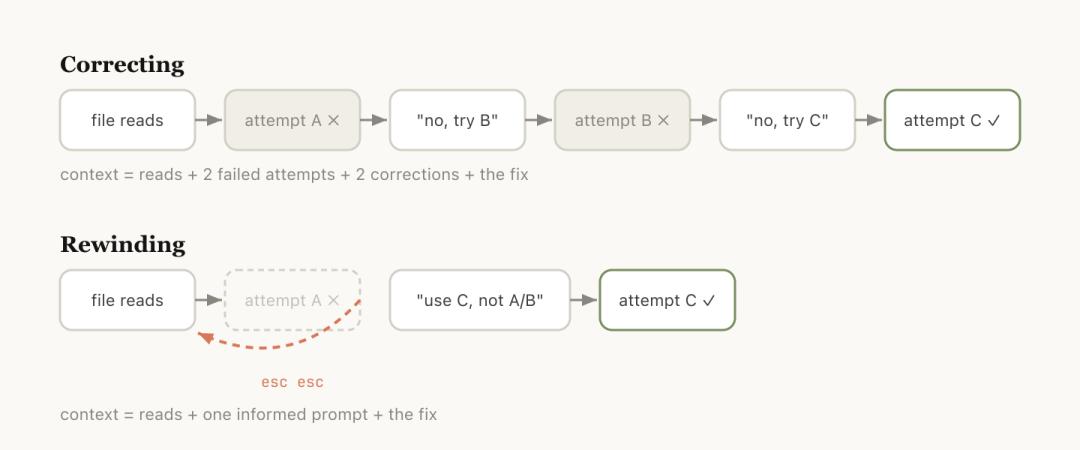
Rewinding is usually a better correction method.
For example, if Claude read five files and tried a method that didn’t work, your instinct might be to say, “This doesn’t work, try another method.”
But the problem with this approach is that the entire process of that failed attempt remains in the context, continuing to pollute subsequent judgments.
A smarter approach is to rewind to the point after reading the files and send a more precise instruction with new information: don’t use method A, the foo module doesn’t expose that interface, go directly to B.
Useful file reads are retained, while failed attempts are discarded. The context is clean.
You can also have Claude summarize what it has learned and create a handover message. This is like leaving a note for Claude in the future: I tried this path, and it didn’t work.
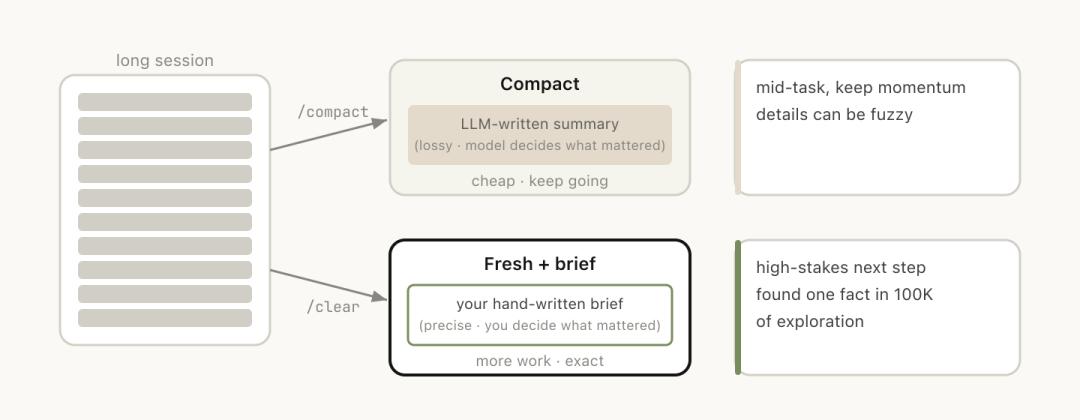
Third option: /clear. Start a new session with a brief explanation: what was done before, what is to be done now, and which files are relevant.
The advantage is zero rot; the context is entirely under your control. The downside is that it’s labor-intensive, and you have to write all the background yourself.
Fourth option: /compact. Have the model summarize the current conversation, replacing the original history with the abstract.
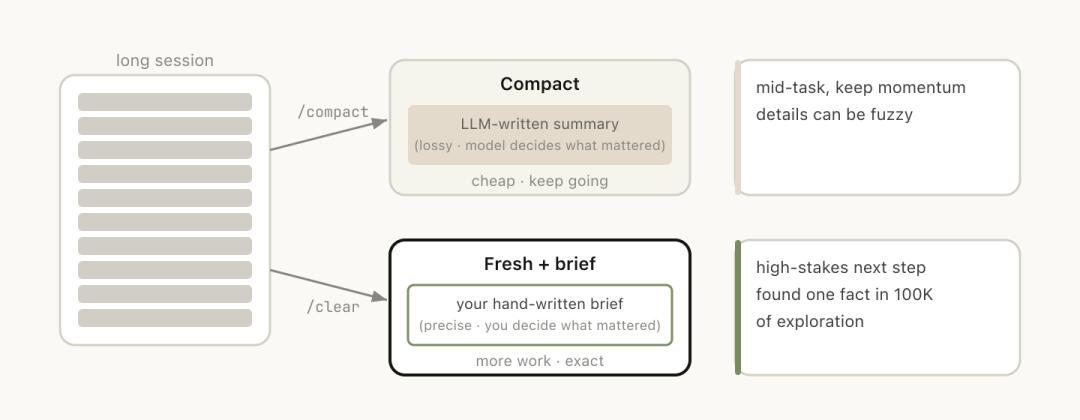
This is convenient but comes at a cost.
You can attach guiding instructions: /compact focus on the auth refactor, drop the test debugging.
This tells it what to keep and what to discard, rather than leaving it to guess.
/clear and /compact may seem similar, but they behave very differently:
/compact has the model decide what is important, which is convenient but may lose key information, while /clear requires you to write down the key content, which is labor-intensive but precise.
Fifth option: Subagents.
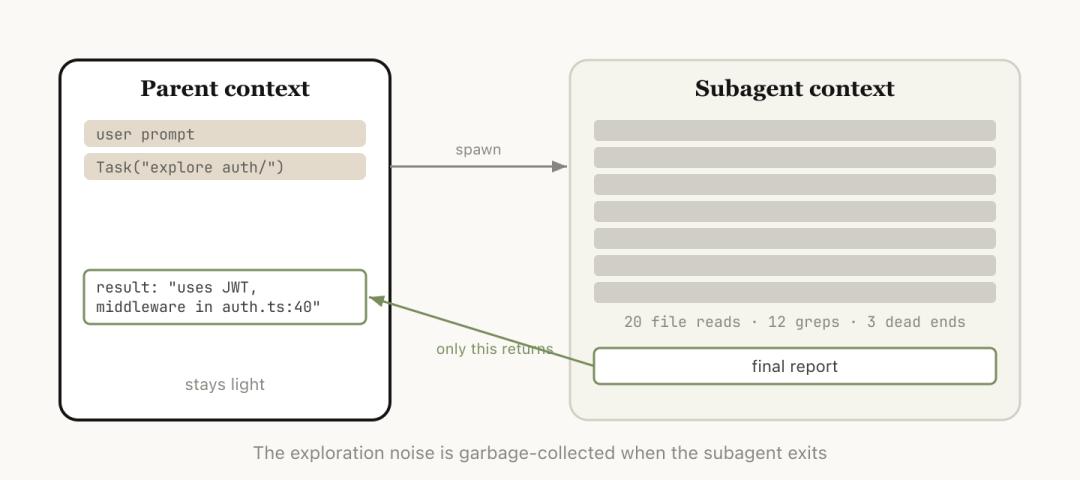
Delegate a task to a sub-agent with its own independent context, which only returns the conclusion after completing the work.
When you know the upcoming task will produce a lot of intermediate output but you only need the final conclusion, subagents are the cleanest solution.
They get a brand-new independent context window to complete all the dirty work, leaving all intermediate processes in the sub-agent’s window, and only the conclusion returns to the main session.
Subagents: Your One-Time Investigator
Among these five actions, the most easily misunderstood is subagents.
Many people associate “sub-agent” with “multi-agent collaboration”: team division, parallel processing, AI employees discussing in meetings.
However, the core value of subagents discussed in Anthropic’s blog is context isolation.
The official documentation clearly states: each sub-agent operates in its own context window.
It can read many files, conduct extensive searches, and run the entire investigation process. But in the end, only a summary and a small amount of metadata will be returned to the main session.
All the massive intermediate processes remain in the sub-agent’s one-time context. Your main session will not be polluted by this noise.
Anthropic’s internal judgment criteria are simple:
Do I still need the outputs from these tools later, or do I only need the final conclusion?
If the answer is the latter, delegate it to the sub-agent.
The blog provides three typical scenarios:
- Let the sub-agent verify the work results based on the specification document.
- Have the sub-agent read another codebase, summarize its authentication process, and then you implement it yourself.
- Ask the sub-agent to write documentation based on your Git changes.
These three scenarios share a common point: the process is heavy, and the conclusion is light.
Thus, the essence of subagents is not that they are your colleagues working alongside you, but rather your “one-time investigator.”
Their workbook can be discarded after the task is completed; you only need to take the last page of the report.
Although Claude Code will automatically invoke Subagents, you can also give it clearer execution instructions, such as:
- Start a Subagent to verify the results of this work based on the following specification document;
- Derive a Subagent to read another codebase and summarize how its authentication process is implemented, and then you implement it in the same way;
- Derive a Subagent to write documentation for this feature based on my Git changes.
Beware of the Automatic Compaction Pitfall
Anthropic candidly admits a pitfall many developers have encountered: the automatic compaction failure.
When does this failure happen? When the model cannot predict what you will do next.
The blog provides an example:
You had a long debugging session, and automatic compaction was triggered, summarizing the entire troubleshooting process. Then you suddenly say, “Now fix that warning in bar.ts.”
But because the entire session mainly revolved around debugging, that warning was just something you glanced at along the way, and it was already discarded during compaction.
The tricky part is that the moment automatic compaction is triggered is precisely when the context is longest and the model’s performance is at its worst.
You are asking a model that has already “lost focus” to decide what information is important and what can be discarded.
Fortunately, the one million token window provides a buffer.
You don’t have to wait for automatic triggering; you can proactively /compact in advance and attach a note: what to do next, and which information must be retained.
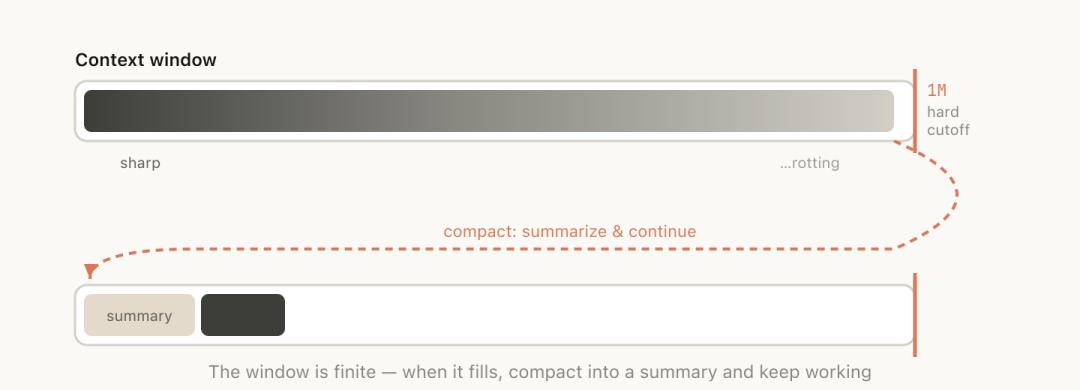
Perform compaction when the model is most alert, rather than waiting until it is confused and passive.
Ultimately, automatic compaction is not unusable, but it should not be blindly trusted.
Five Paths, One First Aid Kit
While the most natural approach is to continue, the other four options can help you manage context.
These five paths together form a first aid kit for preventing and treating “context rot.”
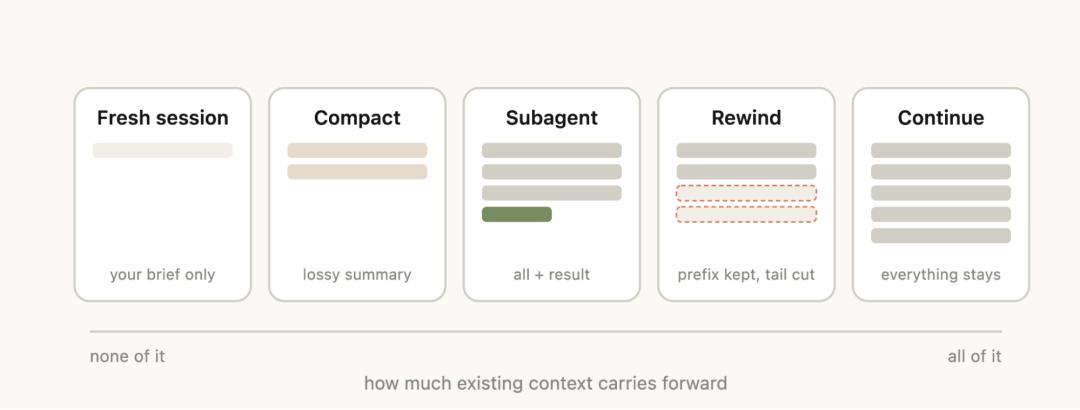
Anthropic’s official diagram: five context management actions, from left to right, retaining more old context.
At the end of the blog, there’s a decision table that matches tools to scenarios:
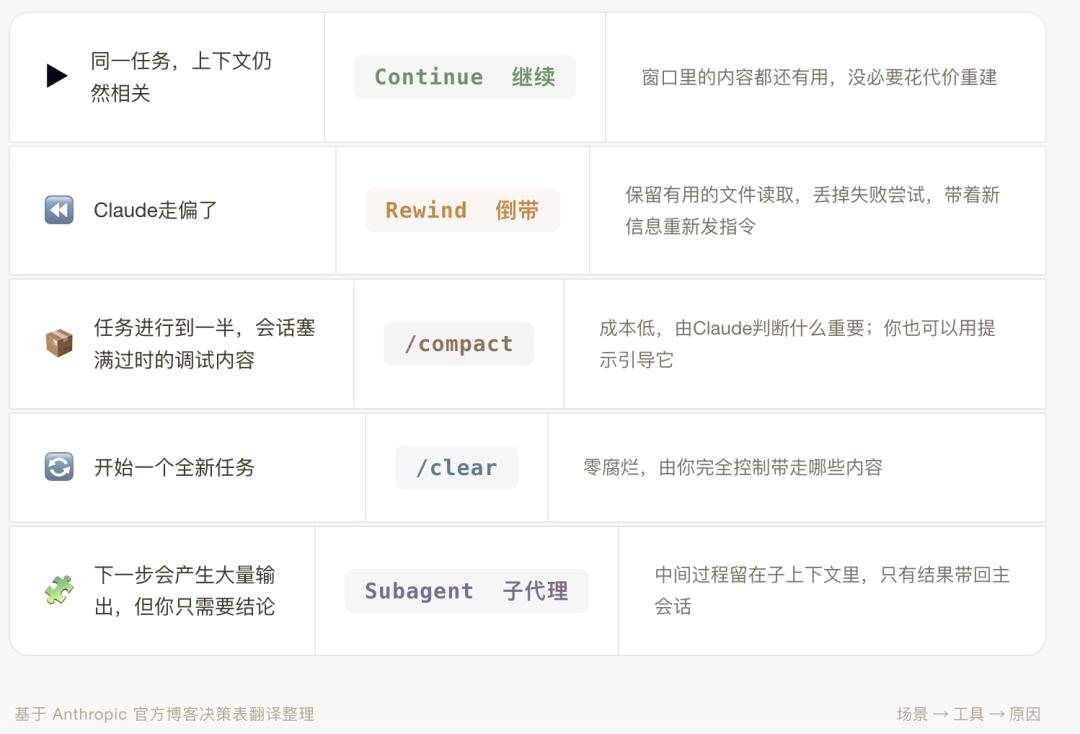
Every press of the Enter key is a context decision.
Five scenarios, five tools; choosing correctly keeps the context clean, while choosing incorrectly makes the model dumber.
Thus, after each interaction, take a second to think: is my context still clean? Which path should I take next?
The Other Side of One Million Context is a Million Token Bill
In addition to managing context quality, Anthropic has also done another thing:
Let developers see their consumption.
The blog starts by mentioning the launch of the new command /usage, “born from multiple discussions with our customers.”
What does /usage do?
According to Claude Code’s official command documentation, it serves to “display the status of usage limits and rate limits.”
Note that this is not a context management tool.
It does not compress, rewind, or clear; it only does one thing: let you see how much you have used, how much is left, and whether you have hit the rate limit.
But this is precisely what developers are most anxious about.
One million tokens sounds great, but tokens are not free.
After a long session, how much quota have you consumed? Will automatic compaction trigger without your knowledge, discarding key information? How far are you from the rate limit?
Previously, these questions had no answers; now Anthropic provides a transparent window.
This feature is small, but it indicates that Anthropic has realized that in the era of one million tokens, “affordability” and “effective use” are two issues that must be solved simultaneously.
Just providing capability without visibility will eventually lead developers to pitfalls and loss.
After Prompt Engineering Comes Context Engineering
Taking a step back to see the big picture.
In February this year, Anthropic released Sonnet 4.6, confirming the one million token context window (beta).

That announcement addressed the question of whether the model could handle such a long context.
User feedback has been positive: it can read context more effectively before modifying code.
On April 15, this blog addressed the question of how to use it. It directly acknowledges the real limitations and provides a systematic management method.
Together, these two steps form a complete loop: first, provide you with the tools, then teach you how to use them without hurting your wallet.
Prompt engineering has been discussed extensively in recent years. However, what may truly determine the ceiling of AI programming is the next term: context engineering.
How to feed context, when to clean it, which information should be isolated, and which should be retained—these questions were previously based on intuition, but now Anthropic is beginning to provide a methodology.
Context engineering is becoming a mandatory course in the era of AI programming.
Comments
Discussion is powered by Giscus (GitHub Discussions). Add
repo,repoID,category, andcategoryIDunder[params.comments.giscus]inhugo.tomlusing the values from the Giscus setup tool.